Business Objects Page
Use the Business Objects page to import Business Object Package Files, enable CygNet Business Object Operations, select security applications and events, and export the applied Package. The Enterprise Operations EIE has an opt-in model for operations. By default, no operations are enabled and no services are allowed to provide data for processing requests. You must opt in for every operation and every service.
|
Enterprise Operations EIE - Business Objects Page |
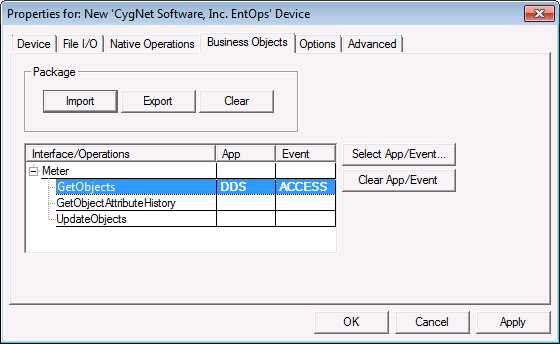
For the device to process a CygNet Business Object (CBO) operation, the operation’s security application and event must be specified, and it must be applied to the imported Business Object Package.
Package Files
| Package | Description |
|---|---|
|
Import |
Imports a Business Object Package from a selected file location |
|
Export |
Exports the applied Business Object Package to a selected file location |
|
Clear |
Clears the applied Business Object Package |
Enabling Operations
| Field | Description |
|---|---|
|
Interface/Operations |
Displays the list of interfaces and available operations for the chosen package. |
|
App |
Displays the security application(s) currently being used by the selected operation(s) |
|
Event |
Displays the security event(s) currently being used by the selected operation(s) |
| Option | Description |
|---|---|
|
Select App/Event |
Selects the security application and event to be used with the selected operation(s) |
|
Clear App/Event |
Clears the security application(s) and event(s) currently being used by the selected operation(s) |
To Enable CygNet Business Object Operations
- On the Business Objects tab, choose a Business Object Package to import by clicking Import.
- Navigate to the file location of the package you would like, select it, and click Open.
- Select the Interface/Operation you would like to enable.
- Click Select App/Event… to display a list of Security Applications and Events.
- Make your security setting selection and click Apply.
- Click Clear App/Event to clear the security setting selection. Repeat steps 4 and 5 to select a new setting.
- Repeat steps 1-5 for additional operations you would like to enable.
- Click Export to navigate to the file location for the package. Click Save.
- Click OK.


